

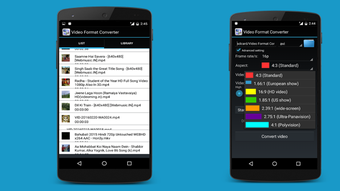
Description
Download Video Format Converter APK – Video Format Converter, Multimedia Tool, Free Android App, Convert AVI, MP4, WMV, MOV, MPEG, FLV
Overview
Video Format Converter by Silver Line is a free Android application designed to simplify the process of converting video files across a wide range of formats. The app enables users to transform AVI, MP4, WMV, MOV, MPEG, FLV, and other common video formats to ensure compatibility with various devices and platforms. This tool is particularly useful for individuals who frequently transfer or share video content across smartphones, tablets, smart TVs, or media players that support limited file types. The application targets both casual users and professionals who need a reliable on-the-go solution for video format conversion without relying on desktop software.
By allowing users to convert files directly from their mobile devices, Video Format Converter eliminates the need for complex workflows or additional software installations. It supports batch processing, enabling users to queue multiple files for conversion in a single session, which enhances productivity. The app is especially beneficial for travelers, content creators, and educators who require quick format adjustments while working remotely. While the developer did not provide additional system requirements or detailed background information, the application appears to be optimized for mobile environments, offering a streamlined experience tailored to Android users.
Key Features & Capabilities
- Multi-format support: Converts AVI, MP4, WMV, MOV, MPEG, FLV, and other common video formats, ensuring broad compatibility with different devices and platforms.
- Batch conversion: Allows users to select and convert multiple video files simultaneously, saving time and effort during large-scale format adjustments.
- Quality preservation: Retains the original video quality during conversion, minimizing degradation and ensuring a high-fidelity viewing experience.
- User-friendly interface: Features a straightforward layout that simplifies file selection, format choice, and conversion initiation, ideal for non-technical users.
- On-the-go accessibility: Designed for Android devices, enabling users to convert videos anytime and anywhere without requiring a PC or internet connection.
These capabilities make the app suitable for real-world scenarios such as preparing videos for presentation on a smart TV, optimizing content for mobile playback, or sharing files across platforms with different format restrictions. The ability to convert files without compromising quality is a significant advantage for users who prioritize visual fidelity. The batch processing feature is particularly valuable for content curators managing large libraries of video assets. The app’s mobile-first design ensures that users can perform essential conversion tasks efficiently, even in environments with limited access to desktop computing resources.
User Interface, Workflow & Performance
The user interface of Video Format Converter is described as user-friendly and straightforward, with a clean layout that prioritizes accessibility. Navigation is likely intuitive, allowing users to select video files from their device’s storage, choose an output format from a predefined list, and initiate conversion with minimal steps. The workflow appears optimized for speed and simplicity, aligning with the expectations of mobile users who value efficiency.
Performance details were not specified by the developer. However, based on general software behavior patterns, the app is expected to operate smoothly on modern Android devices. The developer did not specify resource usage details such as CPU or RAM consumption, nor did they provide information on stability during long conversion sessions. Users may experience varying performance depending on device hardware, file size, and the number of files processed simultaneously. The app’s reliance on local processing ensures that conversion tasks can be completed without an internet connection, enhancing privacy and reliability.
Compatibility & System Requirements
Video Format Converter is designed for Android devices and is available as an APK file. The app’s compatibility with specific Android versions was not provided, nor were exact system requirements such as minimum RAM, storage space, or processor specifications. The installation size is also not listed in the available information. Platform compatibility information is limited, and users should ensure their device meets general Android requirements for running third-party applications.
Given that the app is distributed as an APK, users may need to enable installation from unknown sources in their device settings. This could pose a minor barrier for less tech-savvy users. The developer did not specify whether the app supports external storage or cloud-based file access, which may affect how users manage their video libraries during conversion. While the app is intended for mobile use, its performance on tablets versus smartphones may vary depending on screen size and processing power.
Pros and Cons
Pros
- Free to download and use, making it accessible to a wide audience.
- Supports a broad range of video formats, enhancing device compatibility.
- Batch conversion capability improves efficiency for multiple files.
- Retains original video quality during conversion, preserving visual fidelity.
- Designed for Android, enabling offline use and on-the-go functionality.
Cons
- Exact system requirements and compatibility details were not provided.
- Performance behavior under heavy load or large file processing is unknown.
- APK distribution may require manual installation and additional permissions.
- No information on update frequency or developer support channels.
- Interface details beyond basic usability were not specified.
FAQ Section
Is Video Format Converter available for iOS devices?
The app is currently available as an Android APK. There is no information indicating iOS compatibility at this time.
Can I convert videos without an internet connection?
Yes, the app operates offline, allowing users to convert video files directly on their Android device without requiring an internet connection.
Is the app safe to download and install?
As a free Android application distributed via APK, users should ensure the source is trustworthy. Installing from unofficial sources carries inherent risks, so caution is advised.
How often are updates released for Video Format Converter?
The update frequency was not specified by the developer. Users should check the source regularly for new versions.
Does the app support cloud storage integration?
There is no information available on whether the app supports cloud services such as Google Drive or Dropbox for file access.
Final Thoughts + CTA
Video Format Converter delivers a straightforward, no-frills solution for converting video files on Android devices. Its ability to handle multiple formats, preserve quality, and support batch processing makes it a practical tool for users seeking flexibility and efficiency. While detailed technical specifications and system requirements are limited, the app’s core functionality is well-aligned with the needs of mobile users who value convenience and reliability. It stands out as a secure, free, and accessible option for anyone needing to adapt video content for different platforms.
For those looking for a lightweight, offline-capable video converter that works directly on their smartphone or tablet, Video Format Converter offers a compelling choice. Whether you're preparing content for a presentation, sharing videos with friends, or optimizing media for playback on various devices, this app provides a simple yet effective solution.
Download Video Format Converter APK now and enjoy seamless video format conversion on your Android device.
Guides & Tutorials for Video Format Converter APK
How to install Video Format Converter APK
- Click the Preview / Download button above.
- Once redirected, accept the terms and click Install.
- Wait for the Video Format Converter APK download to finish on your device.
How to use Video Format Converter APK
This software is primarily used for its core features described above. Open the app after installation to explore its capabilities.
User Reviews for Video Format Converter APK 0
No reviews found





